
Tax Compliance Audits: Preparing with Confidence
Prepare for tax compliance audits with confidence using our expert strategies, common audit triggers, and practical steps to protect your business.
A poorly designed invoice can cost you money and damage client relationships. We at My CPA Advisory and Accounting Partners know that a professional invoice template for accounting services isn’t just about looking good-it’s about getting paid on time and maintaining clear records.
The right template saves you hours each month and reduces billing errors. This guide walks you through everything you need to build one that works for your practice.
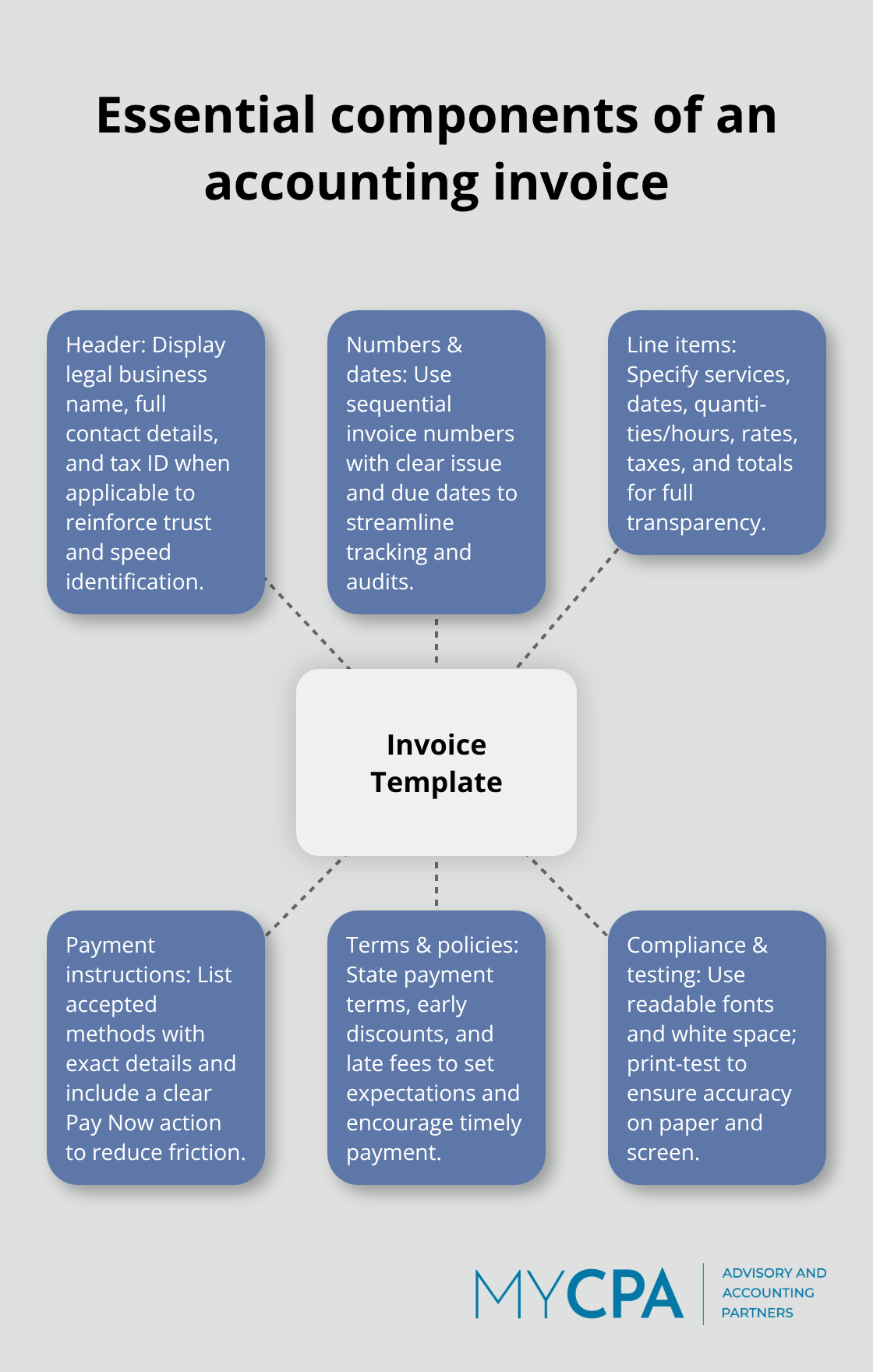
Your invoice header sets the tone for payment. Place your company name, logo, and complete contact information at the top in a way that stands out from the rest of the invoice. Professional headers reduce payment delays by making it obvious who issued the invoice and how to reach you. Include your full legal business name, physical address, phone number, email, and tax identification number if applicable. For sole traders, add your personal name and correspondence address to satisfy compliance requirements. The header should take up roughly 15-20% of your invoice space and use your brand colors to reinforce identity, but avoid cluttering it with unnecessary details.
Unique invoice number matters for tracking and record-keeping. Use sequential numbering starting from 001 or 1001, depending on your preference, and never skip numbers even if you delete a draft. This consistency makes it easy to spot missing invoices during audits and helps you retrieve specific invoices quickly by number. Include the issue date and a precise due date on every invoice. Set your due date 30 days from the issue date as standard practice, though you can adjust this based on your client agreements. For accounting services, also include your payment terms clearly: whether you accept late fees, if you offer discounts for early payment (like 2% off if paid within 10 days), and what happens if payment extends beyond 30 days. This prevents confusion and sets expectations upfront.
Vague service descriptions create payment delays and audit red flags. Instead of writing something like accounting services or consulting work, specify exactly what you delivered: monthly bookkeeping for 4 hours at $150 per hour, quarterly tax planning consultation for 2 hours, or annual financial statement review. Include the service date, quantity or hours, hourly rate, and the total for each line item. List taxes and fees as separate line items adjacent to service costs with the applicable tax rates clearly shown. Calculate subtotals, apply taxes, and display the final total due prominently so clients know exactly what they owe. For accounting practices using retainer-based billing, show the retainer amount, any additional hours billed at your standard rate, and the total due. If you offer add-ons like rush fees or document preparation charges, itemize them separately rather than burying them in vague terms.
Clients pay faster when you make payment simple. List your accepted payment methods clearly: credit or debit cards, bank transfer, PayPal, checks, or payment portal links. Provide the specific instructions or account details needed for each method so clients don’t have to ask questions. Include a prominent “Pay Now” button or link if you use online payment gateways. The easier you make payment, the sooner money reaches your account. Add a space for personalized notes or special instructions on each invoice. This section also works well for thanking clients for their business or noting any upcoming service changes.
Your invoice serves as a legal document for record-keeping and tax reporting, so accuracy matters. Include your tax registration number near the business details or tax line if required by your jurisdiction. Note any tax exemptions or special tax conditions directly on the invoice to avoid confusion. Use a readable font (Arial, Calibri, or Times New Roman at least 10pt) and maintain clean sections with dividers and white space. A well-formatted invoice improves readability and reduces payment delays. Test your template by printing a sample copy to verify that all details appear correctly and that the layout works on paper as well as on screen.
The foundation you build now with a solid template directly impacts how smoothly your billing process runs. Next, we’ll explore the specific tools and software that make creating and managing these templates efficient and scalable for your practice.
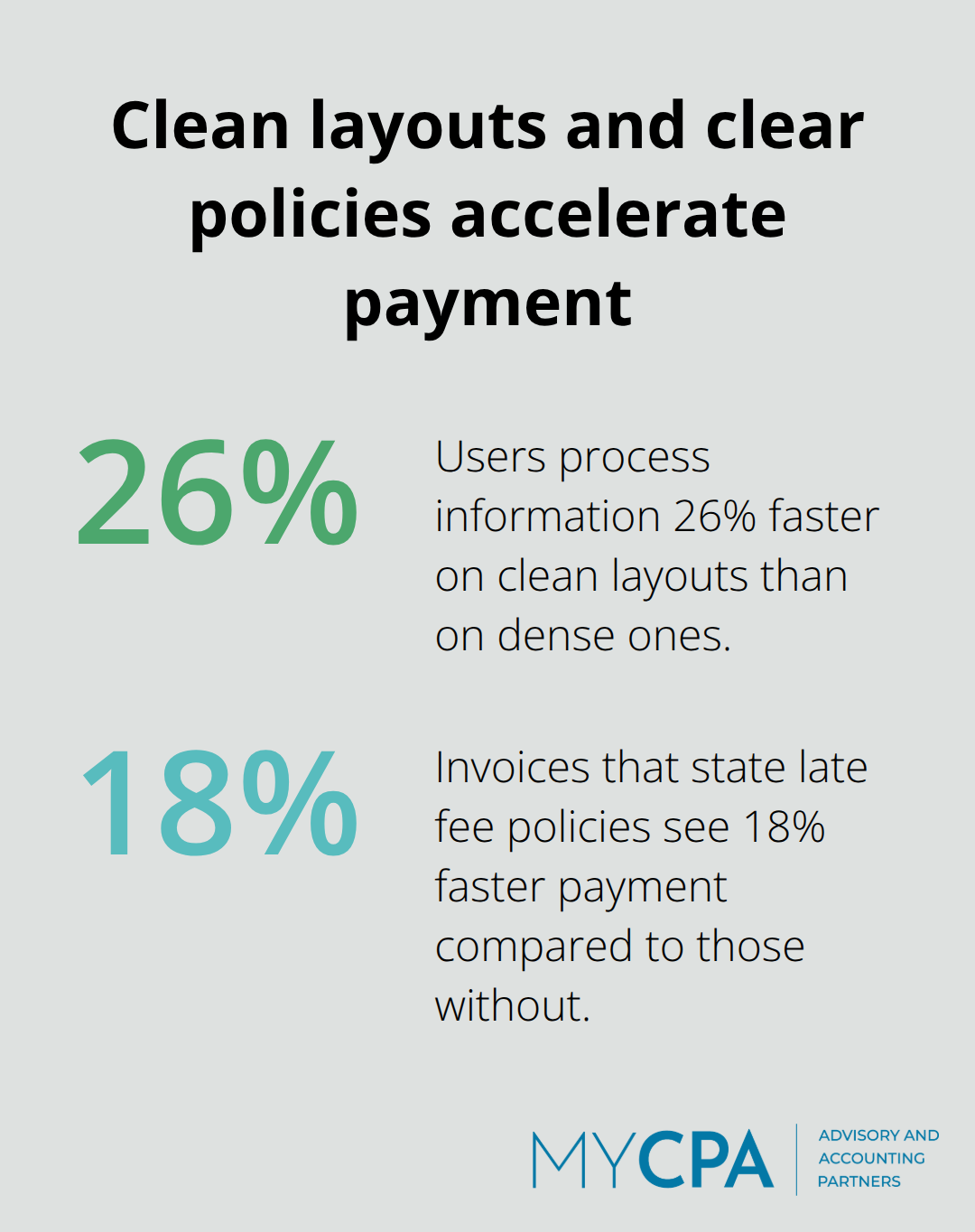
A cluttered invoice costs you money. Cluttered invoices confuse clients, delay payments, and create unnecessary back-and-forth emails. The solution is straightforward: strip away everything unnecessary and organize what remains for instant comprehension. Start with white space as your primary design tool, not an afterthought. A study by the Nielsen Norman Group found that users process information 26% faster on clean layouts compared to dense ones. Your invoice should have breathing room between sections, with line items separated by subtle dividers rather than heavy borders. Use a single column layout for the main invoice details, then transition to a table format for itemized services. This prevents clients from scanning multiple columns and missing payment information.
Your font choice matters more than most accounting professionals realize. Arial and Calibri render identically on screens and printers at 11pt, making them your safest options. Times New Roman works if your firm projects a traditional, established image, but avoid decorative fonts entirely-they reduce trust and slow reading speed. Set your margins at 0.75 inches on all sides to maximize usable space without feeling cramped. The header should occupy no more than 20% of total invoice height, pushing all critical information like the total due and payment deadline into the upper two-thirds of the page where clients look first.
Organize your service table with columns in this specific order: service description, date provided, quantity or hours, rate, and line total. This sequence matches how clients naturally process billing information-they want to know what they paid for before seeing the numbers. Include the service date for every single item, even if it’s a retainer invoice covering a full month.
For accounting services specifically, avoid generic descriptions like bookkeeping or tax work. Instead write monthly bookkeeping services for March 2025 including accounts payable, accounts receivable, and bank reconciliation, or quarterly tax planning consultation for Q1 estimated payment strategy and deduction optimization. Clients pay faster when they understand exactly what they received. Separate your retainer amount from additional billable hours on the same invoice. Show the retainer total on one line, then list any overage hours at your standard rate below it. This prevents confusion about whether the client has already paid part of the invoice through their retainer agreement.
Place your subtotal, tax calculation, and final total in a distinct box or shaded section at the invoice bottom. The final total should appear in the largest font on the entire invoice-no smaller than 16pt-with the word DUE prominently displayed beside it.
Payment method information should occupy a dedicated section below the total due, not buried in footer text. List each accepted payment method with specific instructions on a single line: Bank Transfer-routing 123456789, account 9876543210; Credit Card-[payment portal link]; PayPal-[business email]. Provide account holder names and any additional details clients need to complete payment without contacting you. Include your payment terms directly adjacent to the due date, stating something like Net 30 or Due upon receipt.
If you charge late fees, specify the exact amount or percentage: Late Fee: 1.5% per month on balances unpaid after due date. Invoices with explicitly stated late fee policies see 18% faster payment than those without. For accounting practices offering early payment discounts, show them as a separate line item above the total: Early Payment Discount (2% if paid by [date]): -$[amount]. This incentivizes faster payment and improves your cash flow without reducing your actual rate.
Include a personalized notes section at the invoice bottom with space for messages like Thank you for choosing our firm or Contact us with any questions regarding this invoice. This small addition humanizes the invoice and reduces the likelihood that clients view it as purely transactional. Test your final template by sending it to three different clients and asking whether they understand exactly what they owe and how to pay within 30 seconds of opening it. If any client hesitates, revise the layout before rolling it out firm-wide.
Once your template design is locked in, the next step involves selecting the right software platform to create, send, and track these invoices at scale.
QuickBooks and FreshBooks dominate the market for accounting practices because they handle invoicing alongside your core bookkeeping work, eliminating the need to toggle between separate systems. QuickBooks Online lets you create invoices automatically calculating line totals and taxes based on your client’s location and your tax settings. The software stores all invoice history in one place, making it simple to run aging reports and identify which clients consistently pay late. FreshBooks takes a different approach by prioritizing the client experience-invoices sent through FreshBooks include a Pay Now button connected to Stripe, PayPal, or GoCardless, and clients receive automated payment reminders 3 days before the due date and again 5 days after, which reduces follow-up work on your end.
Both platforms charge monthly fees ranging from $15 to $120 depending on features, but the time savings justify the cost if you bill more than 20 clients monthly. For accounting practices already using QuickBooks for client bookkeeping, staying within that ecosystem means your invoice data syncs directly to your financial records, eliminating manual entry and reconciliation errors. This integration prevents duplicate work and keeps your accounts receivable data accurate without extra effort.
Microsoft Word and Google Docs offer a lower-cost alternative if you prefer controlling every design element yourself. Download a template, customize the header with your logo and branding, adjust the line-item table to match your service offerings, and you have a working invoice template in 30 minutes. The downside is manual: you must enter each client’s details, calculate totals, and track payment status outside the template.
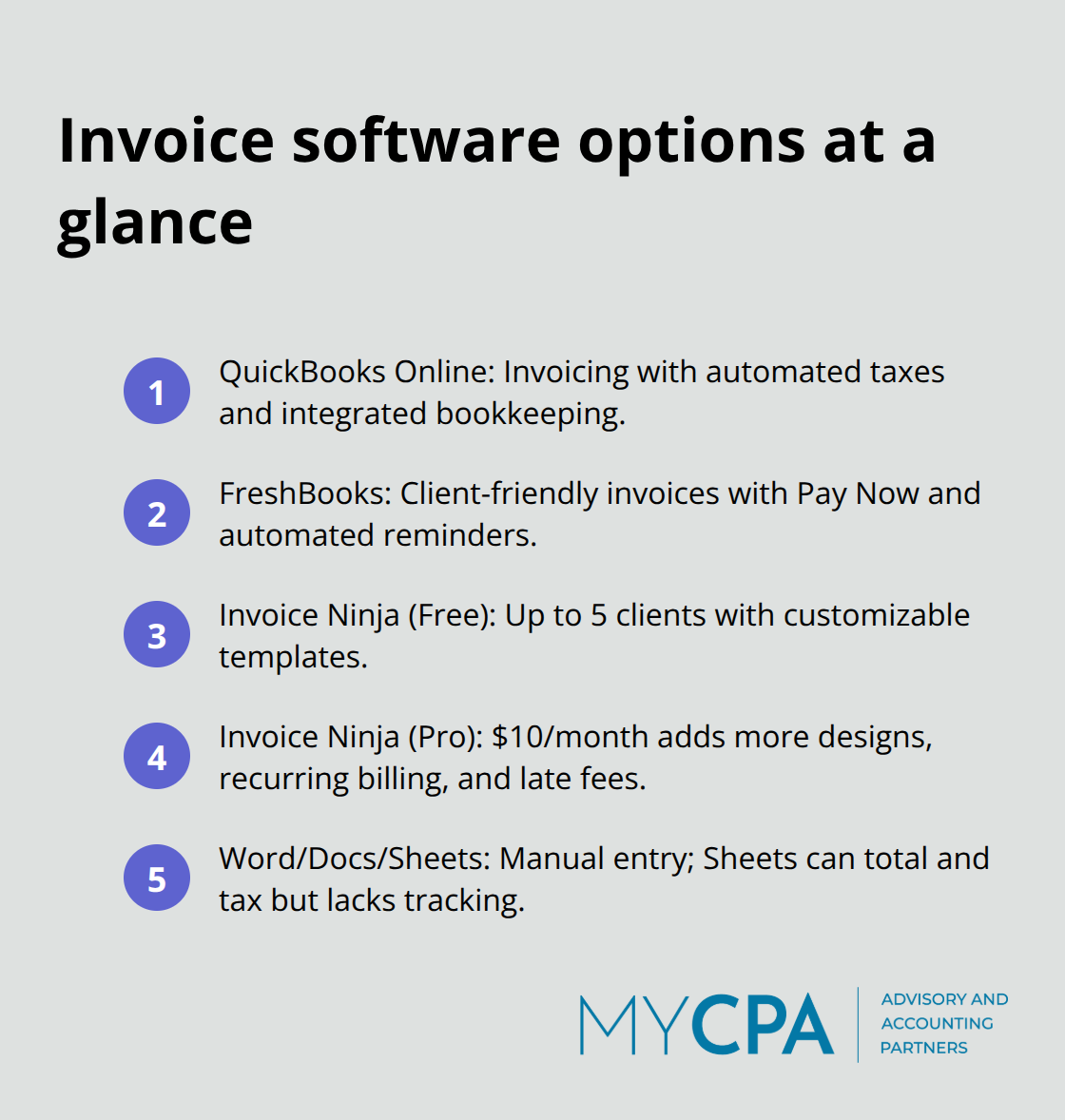
Google Sheets works better for this because you can build formulas that automatically sum line items and apply tax calculations, reducing arithmetic mistakes. However, neither platform sends invoices, tracks payment status, or generates aging reports, so you lose visibility into your accounts receivable.
Online invoice generators like Invoice Ninja sit between these extremes. Invoice Ninja’s free plan supports up to 5 clients with unlimited invoicing and includes 4 template designs you can customize with your logo and brand colors. The Pro plan at $10 monthly adds 11 template designs and advanced features like recurring invoices for retainers, automated late fees, and client portal access where clients view payment history and outstanding balances. Invoice Ninja also integrates with Stripe and PayPal, enabling clients to pay directly from the invoice without leaving their email. Over 200,000 businesses use Invoice Ninja, suggesting it handles the invoicing workload reliably.
For accounting practices billing 10 to 50 clients monthly, Invoice Ninja’s combination of automation, affordability, and client-facing features outperforms Word templates while costing significantly less than QuickBooks. The key decision is whether your practice needs invoicing alone or invoicing plus bookkeeping integration. If you manage client books in QuickBooks, staying there makes sense; if you outsource bookkeeping or work primarily on tax and advisory, a standalone invoicing platform saves money and stays focused on what you actually need. Your choice depends on your firm’s size, billing volume, and whether you already use accounting software for other client work.
A professional invoice template for accounting services transforms how you collect payment. The components we covered-a clear header, sequential numbering, itemized service descriptions, and straightforward payment instructions-work together to eliminate confusion and accelerate payment. Clients who understand exactly what they owe and how to pay settle invoices faster, improving your cash flow without requiring constant follow-ups.
The real benefit of investing time in a solid template is consistency. Once you build one that works, you use it for every client, every month. This consistency reduces billing errors, speeds up invoice creation, and creates a professional impression that builds trust. Accounting practices using standardized templates report fewer payment disputes and shorter collection cycles compared to those sending ad-hoc invoices.
Start by selecting one platform and creating your first template this week. Test it with your next three invoices, then gather feedback from clients about clarity and payment ease. For accounting practices seeking comprehensive support beyond invoicing, My CPA Advisory and Accounting Partners offers tailored financial services including accounting, tax optimization, QuickBooks setup, and business advisory to help you manage finances efficiently while you focus on client work.








Privacy Policy | Terms & Conditions | Powered by Cajabra